
The first week of the semester always feels the same: new notebooks, big plans, a promise that this time you'll stay on top of everything. Then week three arrives, the quizzes start, and the plan quietly disappears.
This guide is here to make this semester different. It has three parts: a simple system for organizing your week, an honest guide to using AI as a study assistant (not a homework machine), and why we built Taziz for the moment you actually sit down to study.
Part 1: Organize your week, not just your semester
A semester plan is too far away to guide today's decisions, and a daily to-do list only reacts to whatever is loudest. The week is the sweet spot: long enough to see your deadlines, short enough to actually control.
1. Do a 20-minute Sunday reset
Every Sunday, before the week starts:
Collect every deadline from your syllabi, the e-learning portal and course groups into one list.
Look at the next 7 days and pick your 3 must-wins — the things that would make this a good week even if nothing else gets done.
Glance two weeks ahead so midterms never surprise you.
2. Put fixed blocks in first
Lectures, labs, commute, work shifts, family time. These aren't negotiable, so they go on the calendar before anything else. What's left is your real study time — usually less than you think, which is exactly why it needs a plan.
3. Give every course a review block within 24 hours
Reviewing a lecture the same day or the next, while it's still fresh, takes a fraction of the time it would take to relearn it the week before the exam. Even 30 minutes per lecture adds up to a semester you don't have to cram.
4. Study in focused sprints
Long sessions feel productive but drain you. Short timed sprints — like 25 minutes of focus and a 5-minute break — keep your attention sharp. We wrote a full guide to it: Focus that lasts: studying with Pomodoro.
5. Use the 48-hour rule for assignments
Start every assignment within 48 hours of getting it — even if it's only 15 minutes to read the brief and write down questions. Starting early is what turns a panic night into a normal week.
6. Protect your rest
Keep Friday (or one full day) light, and leave a couple of empty buffer blocks in the week for the things that always run late. A plan with no slack breaks on the first surprise.
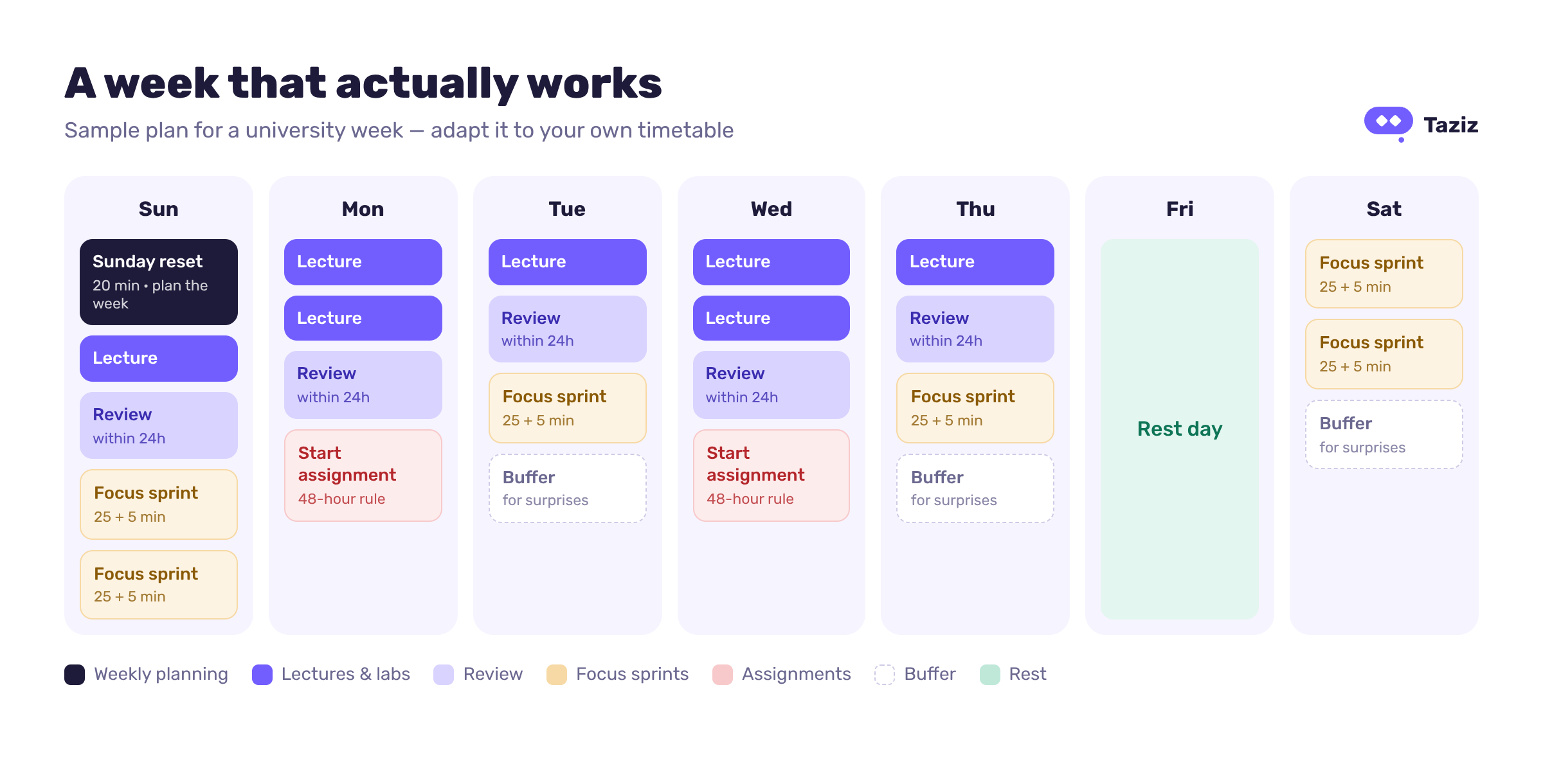
[Sample weekly study plan for university students showing lectures, review blocks, focus sprints, buffer time and a rest day]
Plan less than you think you can do. A realistic week you finish beats a perfect week you abandon on Tuesday.
Part 2: Use AI as an assistant, not as your ghostwriter
AI can be the best study partner you've ever had — or the fastest way to reach exam day without having learned anything. The difference isn't the tool. It's how you use it.
Remember three things: your exams are written without AI, most universities now have clear rules on AI in coursework, and you're paying to actually learn this material.
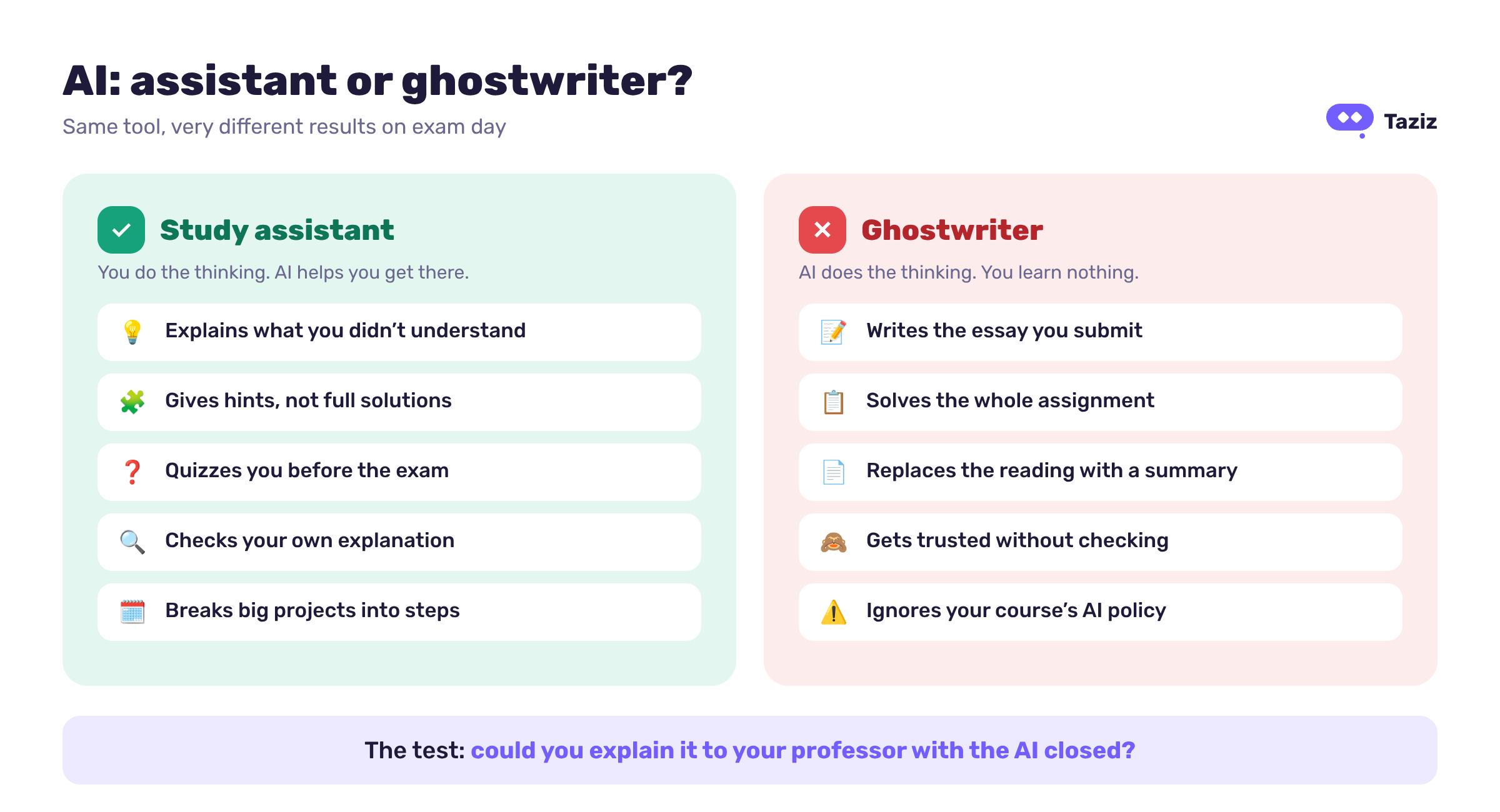
[Comparison of using AI as a study assistant versus using it to do homework]
Six smart ways to use AI for studying
Explain what you didn't get. Try: "Explain this concept as if I'm a first-year student, then give me an everyday analogy."
Check your understanding. Write your own explanation first, then ask: "What did I get wrong or leave out?"
Quiz yourself. "Ask me 5 questions on chapter 3, one at a time. Don't show the answer until I try."
Get unstuck, not solved. "Give me a hint for the next step only."
Understand difficult English. Many courses are taught in English. Translate a tough paragraph to understand it — then write your answer in your own words.
Plan big tasks. "Break this project into small tasks over the next two weeks."
The red lines
Submitting AI-written essays, reports or code as your own work.
Pasting the whole assignment in and copying the answer out.
Replacing the reading with a summary. A summary tells you what's in the chapter; it doesn't put it in your head.
Trusting every answer. AI makes mistakes — check against your slides and textbook.
Ignoring your course's AI policy. When AI is allowed, say how you used it.
A simple test: if you couldn't explain it to your professor with the AI closed, you haven't learned it yet.
Part 3: Why Taziz instead of ChatGPT or NotebookLM?
Let's be honest: ChatGPT and NotebookLM are excellent tools. ChatGPT is a brilliant general assistant and even has a guided study mode. NotebookLM is great at turning a pile of sources into summaries, study guides and audio overviews.
Taziz is built for something more specific: the moment you sit down with your course material and try to understand it. You upload your lecture once, and everything happens on the page you're reading — no copying text into a chat in another tab.
1. Select any passage: Solve, Explain, Translate or Note
Highlight any text in your PDF and a small menu appears. Pick Explain and you get a simple, plain-language explanation of exactly that passage, which you can copy or Save as note. Solve walks you through a problem step by step, and Translate helps with difficult English without leaving the page. More on solving: How AI Solve turns a hard problem into a clear path.
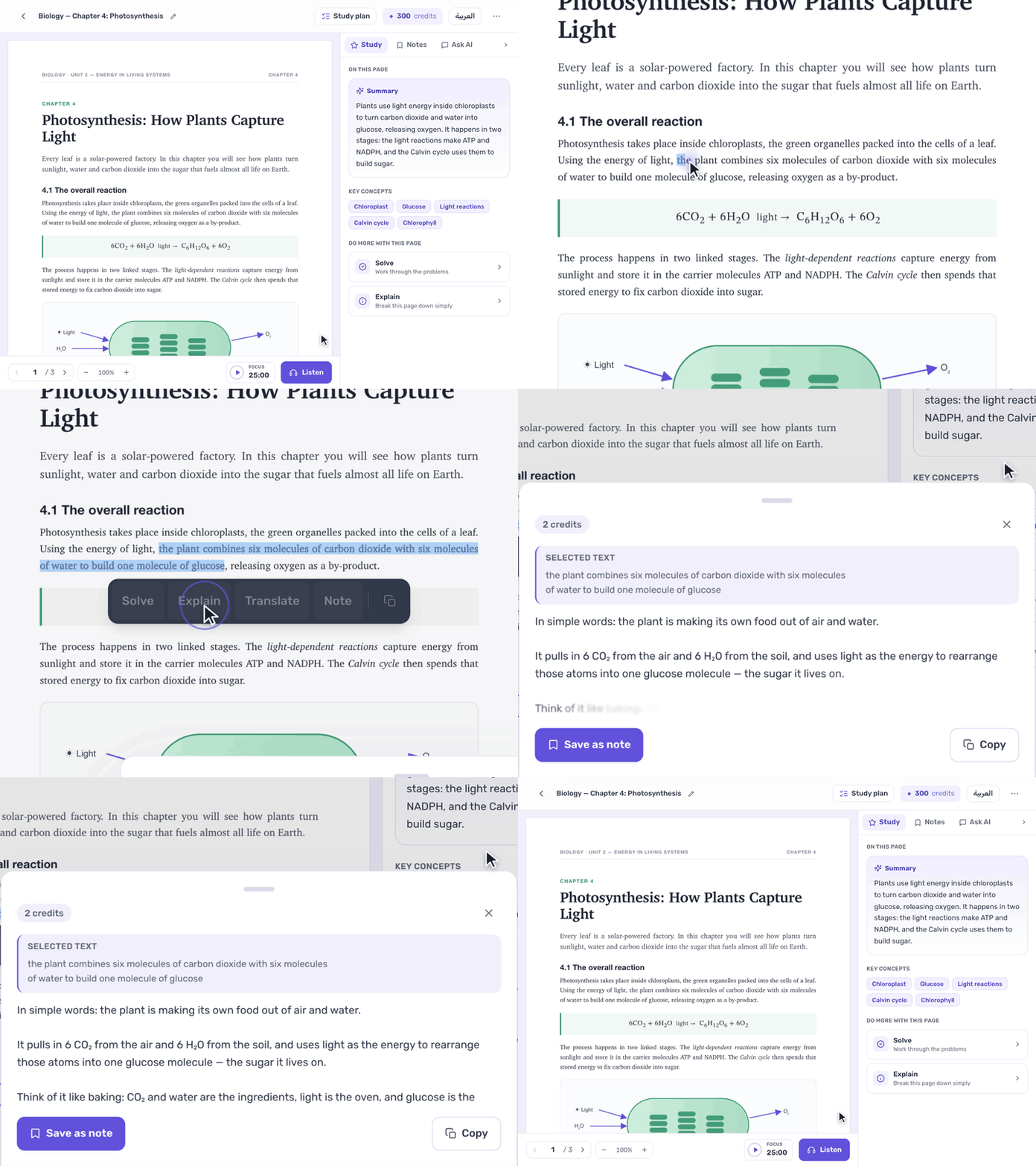
[Taziz: selecting a passage in a PDF and choosing Explain to get a simple explanation]
2. Ask AI about your whole document
Have a question that goes beyond one paragraph? Open Ask AI and ask it about the document you're studying. The answer shows which pages it used, so you can go back and check, and you can copy it or Export PDF.
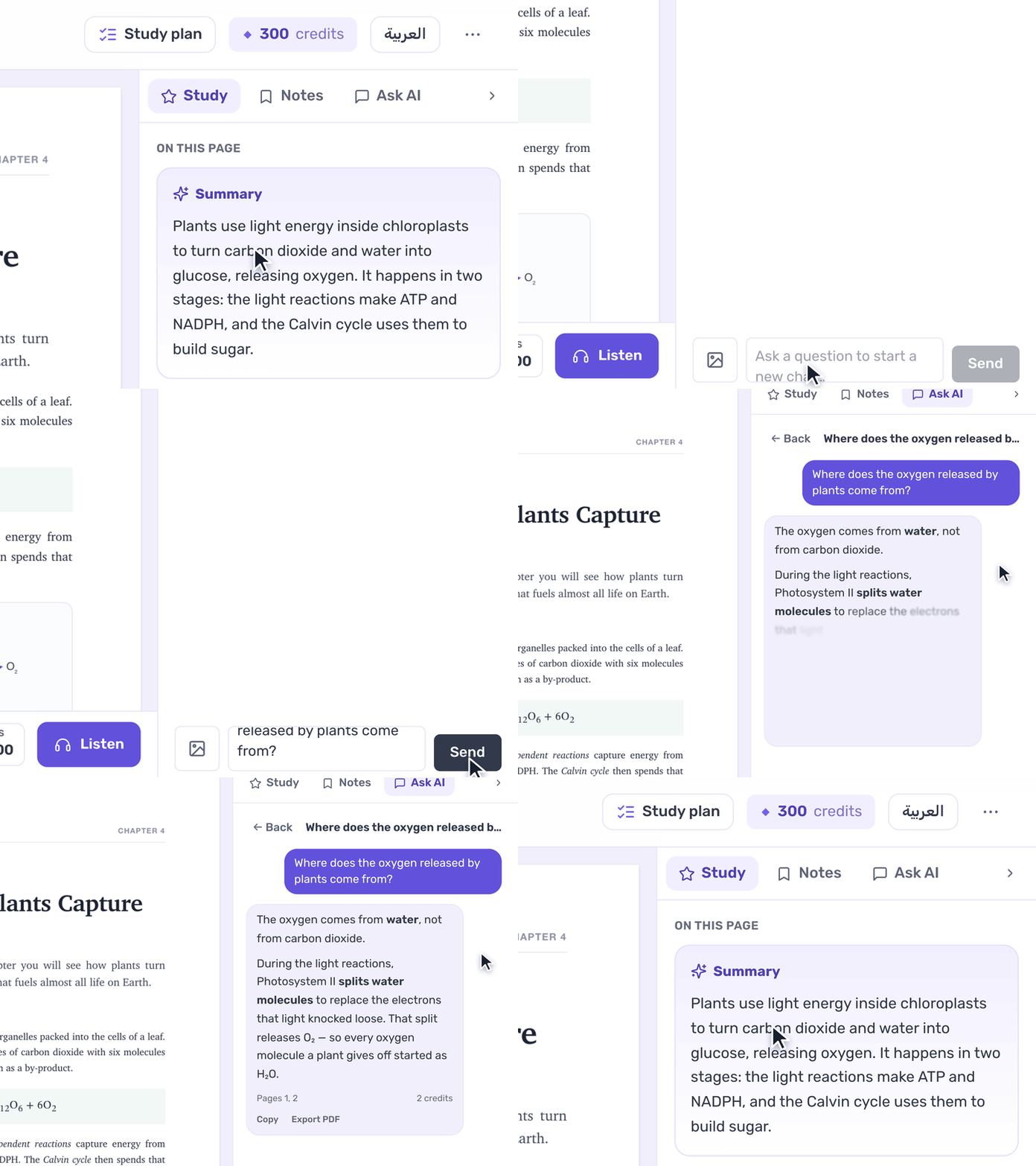
[Taziz Ask AI answering a question about the open document and showing the pages it used]
3. A study plan for every document
Each document gets a study plan with goals for each page, and you tick them off as you go. You can also see your progress — pages covered and time studied — and every page has a short summary and its key concepts in the Study tab.
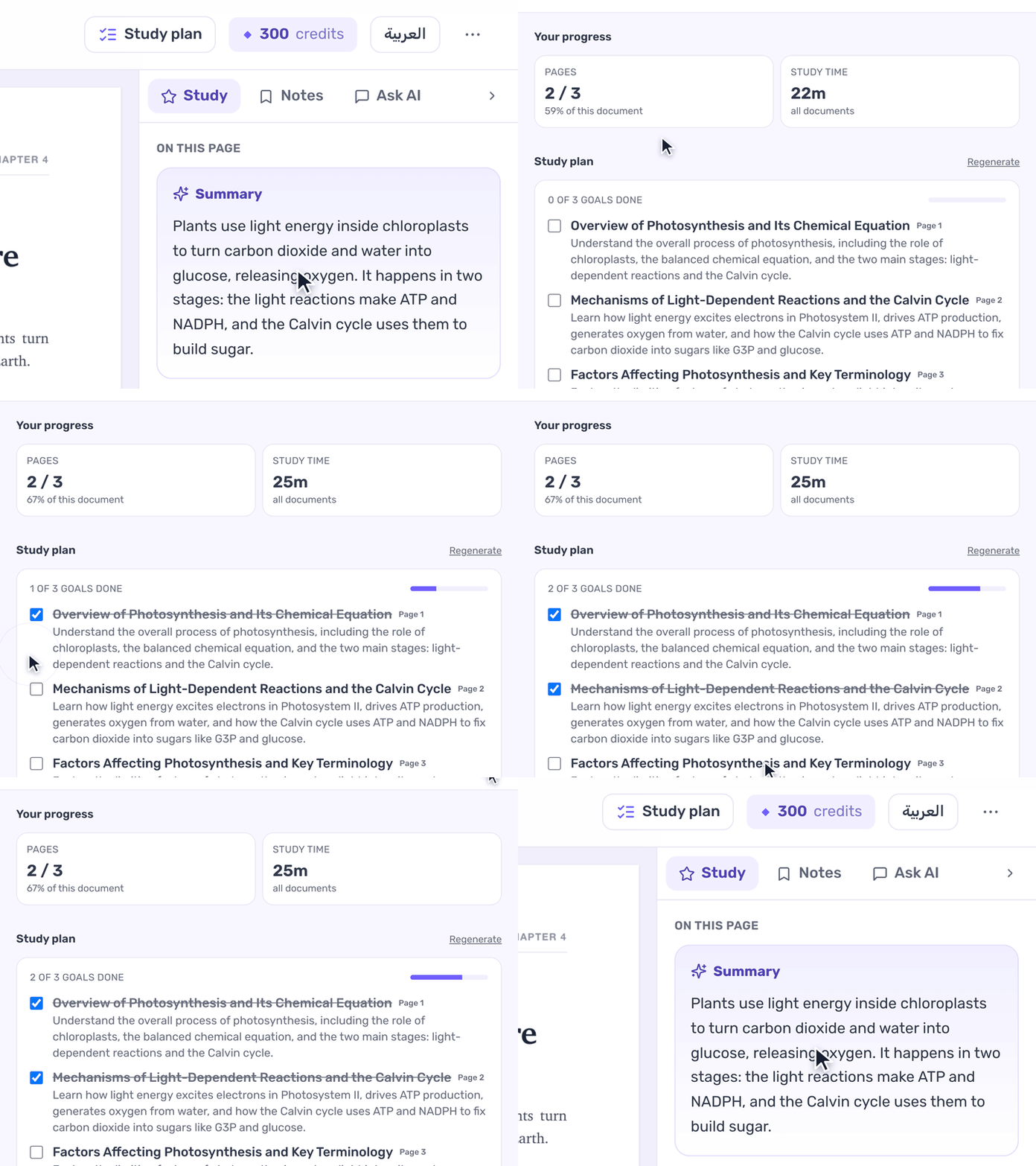
[Taziz study plan with page goals being checked off and progress for pages and study time]
4. A focus timer next to your reading
Start the 25-minute focus timer from the bottom bar. When it ends, Taziz suggests a coffee break, and you choose whether to take the break or keep focusing. It's the Pomodoro method from Part 1, built into the place where you actually study.
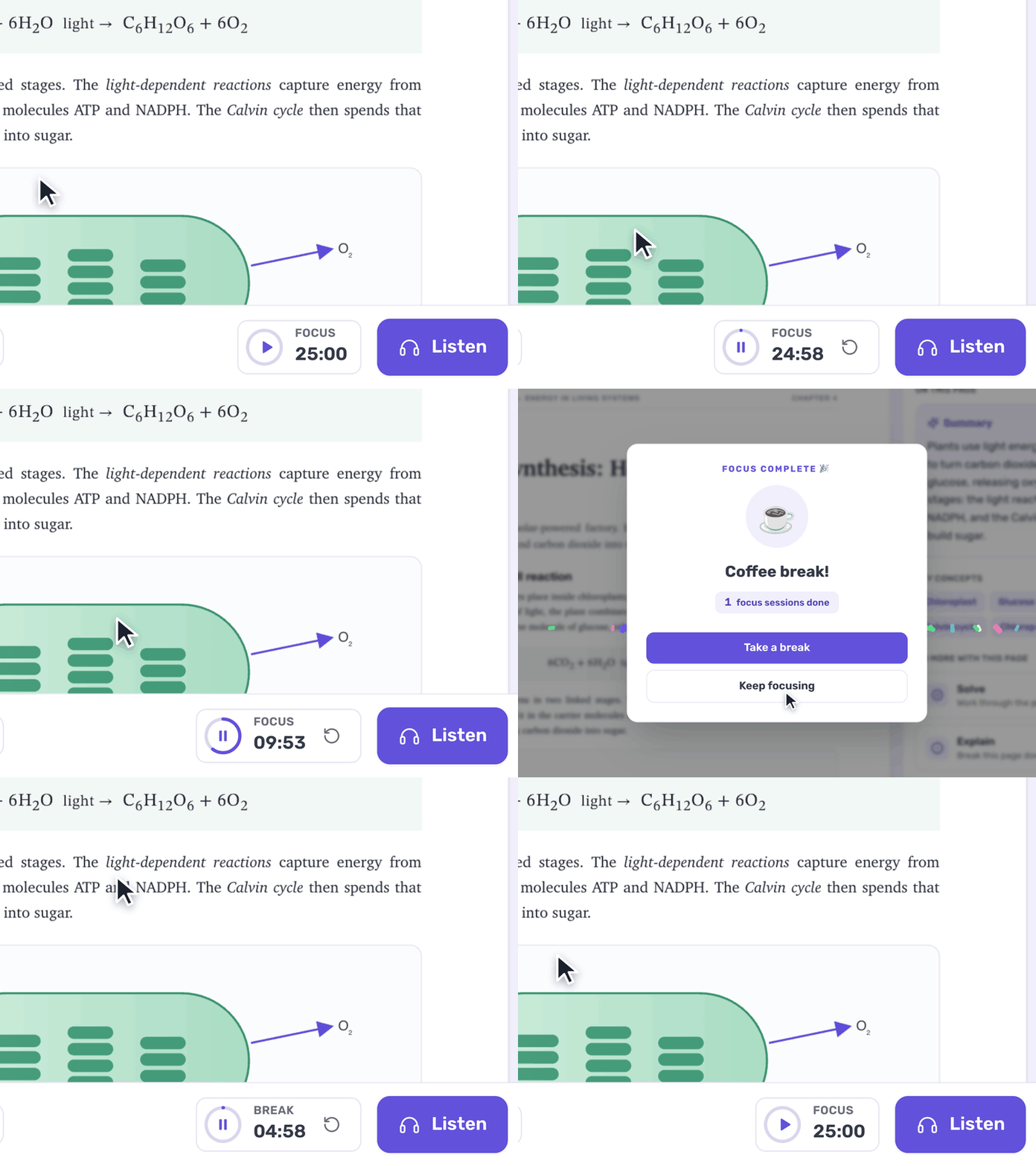
[Taziz focus timer counting down, then offering a coffee break]
5. Notes that stay on the page
Double-click the page to add your own note, or save an AI answer as a note. All your notes are listed in the Notes tab by page, and one tap takes you back to where you wrote it. Revision week means opening your files, not hunting for screenshots.
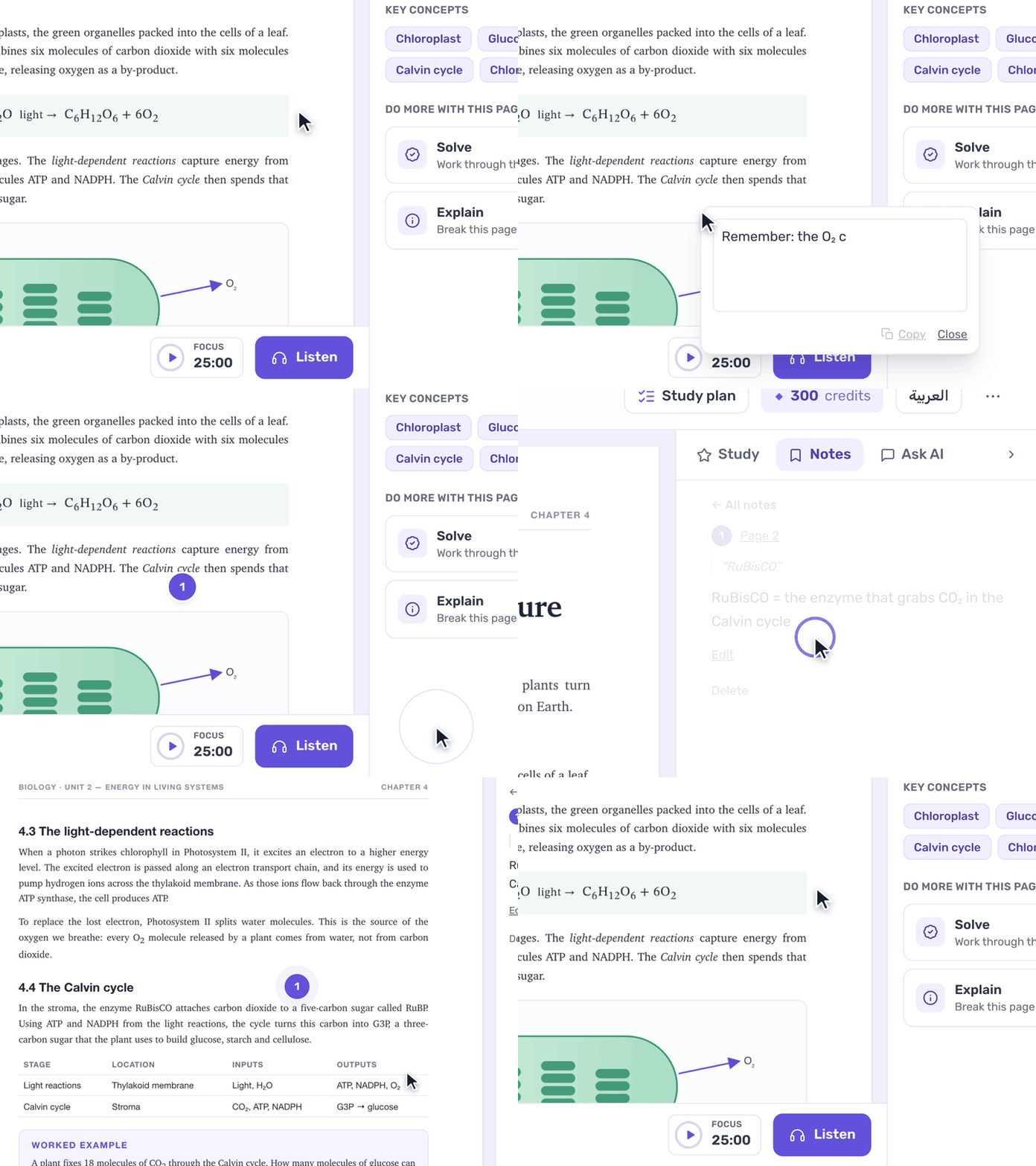
[Adding a note on a PDF page in Taziz and finding it again in the Notes tab]
6. Listen to the page — read or explained
Tap Listen and choose Read to hear the page word for word, or Explain to get an AI explanation of the page, spoken in your chosen language. Choose the voice and the speed, and review on the bus or anywhere your eyes need a break from the screen.
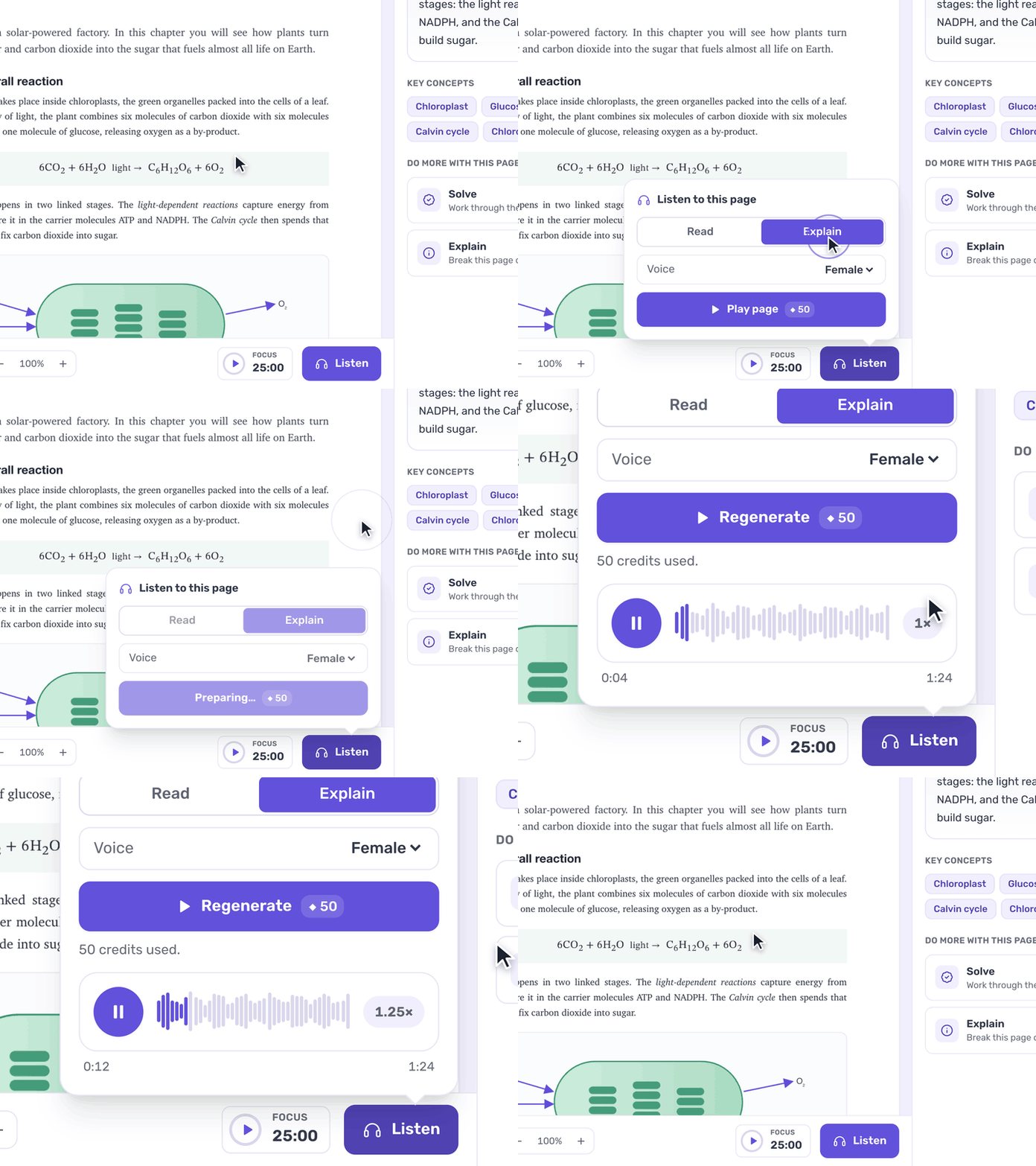
[Taziz Listen panel playing an audio explanation of the page at 1.25x speed]
7. Made in Amman, for Arab students
An Arabic interface, prices in Jordanian dinars, payment through CliQ, and a free plan with 300 AI credits every month. The Student plan is 5 JD a month — see pricing.
Side by side
Taziz | ChatGPT | NotebookLM | |
|---|---|---|---|
Built around | Reading and studying your material | General-purpose chat | Your uploaded sources as a notebook |
Help with one passage | Select it → Solve, Explain, Translate or Note | Copy it into the chat | Ask about it in the notebook chat |
Questions about the whole document | Ask AI, with the pages it used | Upload the file to a chat or project | Its core feature, with source citations |
Study plan | Goals per page, with progress | Ask it to write one | Study guides from your sources |
Focus timer | Built in | — | — |
Audio | Reads the page aloud, or explains it | Voice conversations | Podcast-style audio overviews |
Pricing | Free 300 credits/month; Student 5 JD/month via CliQ | Free tier; paid plans in USD | Free with a Google account; paid tiers |
Comparison as of October 2026. These products change often.
Our honest advice: use the right tool for the job. Quick general question? ChatGPT. Thirty research sources you want summarized as an audio overview? NotebookLM is great at that. Sitting down with this week's lecture to actually understand it, solve the problems and remember it for the exam? That's what Taziz is for.
Your back-to-uni checklist
Put every deadline from every syllabus into one list this week.
Block your Sunday reset in your calendar — 20 minutes, every week.
Add a review block after each lecture.
Read your courses' AI policies.
Upload your first lecture to Taziz and try selecting a passage and choosing Explain.
[IMAGE: tour-upload.gif — alt: Uploading a PDF lecture to Taziz and naming the document]
Good luck this semester — you've got this. 💜